本人前端小透明一枚,如果对vue理解有什么不对或者不够的地方,请各位大大理解斧正,谢谢支持。 本篇文章对应的vue源码为2.6.0-release版本,阅读愉快。
1. vue工程结构
这个部分有很多只是挂载一个api的操作,采取部分解析,部分跳过策略,跳过部分将会在接下来的系列中体积
1.1 图片展示完整工程目录
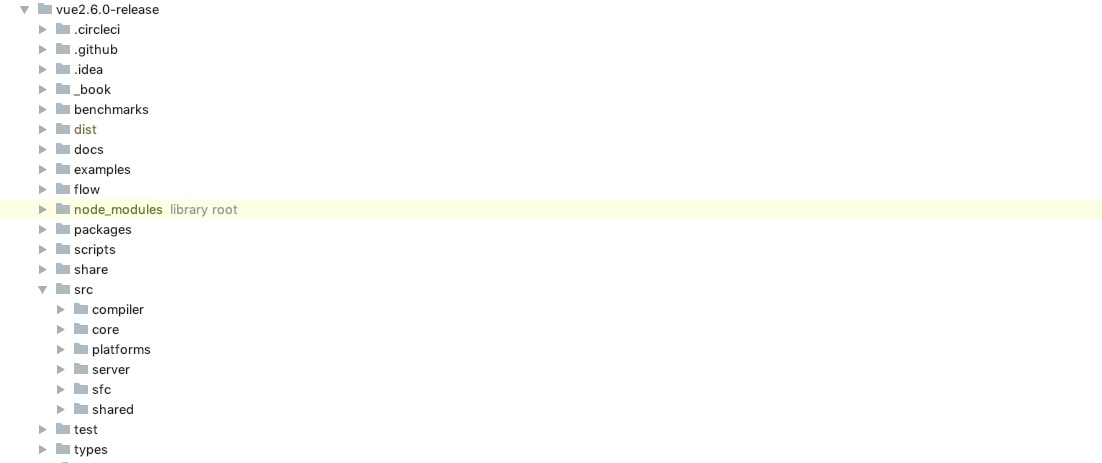
1.2 这边是我们比较关注的文件目录
|-- vue2.6.0-release
    |-- flow                      // 关于flow文件目录 可怜它烂尾了
    |-- scripts                   // 关于构建脚本文件目录
    |-- src
        |-- compiler              // 编译模块
            |-- codegen           // 代码生成
            |-- directives        // 指令  v-bind  v-model  v-on
            |-- parser            // ast语法树生成部分
        |-- core                  // 核心模块
            |-- components        // 内置组件 KeepAlive
            |-- global-api        // extend, assets, mixin, use),observer,util
            |-- instance          // render相关 以及vue构造函数定义 生命周期钩子挂载 原型链上实例方法的挂载
            |-- observer          // 响应式的实现
            |-- util              // 工具包 主要是 debug,lang,next-tick,options(合并策略),props(props处理),env运行环境嗅探
            |-- vdom              // 虚拟dom实现
        |-- platforms             // 运行平台相关  web || weex
        |-- server                // 服务端渲染
        |-- sfc                   // 单文件编译为js文件
        |-- shared                // 基础工具包和生命周期钩子敞亮
    |-- test                      // 测试部分
    |-- types
1.3 config文件
各种类型输出文件的配置文件,关于UMD, CommonJS, AMD可以查阅这篇文章 也可以查看AMD,UMD,CMD,CommonJS,ES6module
const builds = {
  // Runtime+compiler CommonJS build (CommonJS)
  // 这是我这次学习的类型  cjs  nodejs环境
  'web-full-cjs-dev': {
    entry: resolve('web/entry-runtime-with-compiler.js'), // 对应的入口文件
    dest: resolve('dist/vue.common.dev.js'),
    format: 'cjs',
    env: 'development',
    alias: { he: './entity-decoder' },
    banner
  },
  'web-full-cjs-prod': {
    entry: resolve('web/entry-runtime-with-compiler.js'), // 对应的入口文件
    dest: resolve('dist/vue.common.prod.js'),
    format: 'cjs',
    env: 'production',
    alias: { he: './entity-decoder' },
    banner
  }
}
1.3.1 打包时的变量替换
  // 替换打包中的同名变量值,比如version是一个动态的且在打包时由我们指定
  // 获取package.json中的版本号,在代码中会替换vue.version = version的值
  // 一般是开关类  还有标记类

  //   启动后发现的有
  // 1. __WEEX__
  // 2. __WEEX_VERSION__
  // 3. __VERSION__
  // 4. process.env.NEW_SLOT_SYNTAX     // 是否使用新的slot语法
  // 5. process.env.VBIND_PROP_SHORTHAND  // 是否启用快捷绑定语法
  // 6. process.env.NODE_ENV  // 当前环境  dev=development   prod=production(生产环境)会移除掉不必要的告警和提示等
  // built-in vars
  const vars = {
    __WEEX__: !!opts.weex,
    __WEEX_VERSION__: weexVersion,
    __VERSION__: version
  }
1.3.2 别名设定
// 在代码应用中  import ... from 'core'
module.exports = {
  vue: resolve('src/platforms/web/entry-runtime-with-compiler'), // vue全版本入口
  compiler: resolve('src/compiler'), // 编译器入口
  core: resolve('src/core'), // vue核心文件
  shared: resolve('src/shared'), // 工具包
  web: resolve('src/platforms/web'), // web平台入口
  weex: resolve('src/platforms/weex'), // weex平台入口
  server: resolve('src/server'), // ssr入口
  entries: resolve('src/entries'), //
  sfc: resolve('src/sfc') //
}
2. Vue
在使用vue的时候 会有下面这些用法
Vue.mixins({})

new Vue({
  created () {
    // this
  }
})
所以肯定有这么一个地方 定义 Vue () {},我们可以从config中的入口文件开始寻找Vue
=> scripts/config web/entry-runtime-with-compiler      // 打包入口web/entry-runtime-with-compiler
=> src/platforms/web/entry-runtime-with-compiler.js    // import Vue from './runtime/index'
=> src/platforms/web/runtime/index.js                  // import Vue from 'core/index'
=> src/core/index                                      // import Vue from './instance/index'
=> src/core/instance/index                             // 在这里 function Vue
2.1 Vue声明
Vue构造函数声明定义
function Vue (options) {
  // 在测试或者开发环境检测实例是否是通过new Vue的形式生成的 否则告警 因为后续的所有操作都是围绕vue实例进行
  // new Vue() ✔
  // Vue()     ×
  if (process.env.NODE_ENV !== 'production' &&
    !(this instanceof Vue)
  ) {
    warn('Vue is a constructor and should be called with the `new` keyword')
  }
  this._init(options) // 实例执行方法  我们后续会学习到
}
2.2 Vue.prototype API & Vue API
接下来是vue的全局API包装 分为实例原型对象挂载和构造函数API挂载 区别请查看一张图理解JS的原型(prototype、proto、constructor的三角关系) 没有进行实际功能讲解的 都将会在后续文章中出现
2.2.1 initMixin
// 初始化方法挂载
Vue.prototype._init = function () {}
2.2.2 stateMixin
data, props数据代理设置
  /**
   * 数据劫持 这也是Vue实现原理核心 这边用于数据代理
   * 所有Vue实例中形如this.xxx访问data都是在访问this._data.xxx
   * 所有Vue实例中形如this.xxx访问props都是在访问this._props.xxx
   * 劫持data set 对更改this.data指向进行更改的操作进行告警
   * 劫持props set 提示该对象只读
   * */
  const dataDef = {}
  dataDef.get = function () { return this._data }
  const propsDef = {}
  propsDef.get = function () { return this._props }
  if (process.env.NODE_ENV !== 'production') {
    dataDef.set = function () {
      warn(
        'Avoid replacing instance root $data. ' +
        'Use nested data properties instead.',
        this
      )
    }
    propsDef.set = function () {
      warn(`$props is readonly.`, this)
    }
  }
  Object.defineProperty(Vue.prototype, '$data', dataDef)
  Object.defineProperty(Vue.prototype, '$props', propsDef)
  // observer中的set,delete方法
  Vue.prototype.$set = set                  // 设置观测对象
  Vue.prototype.$delete = del               // 观测对象的删除
  Vue.prototype.$watch                      // 实例上的$watch
2.2.3 eventsMixin
  Vue.prototype.$on = function () {}      // 添加监听器
  Vue.prototype.$once = function () {}    // 添加一次性监听器
  Vue.prototype.$off = function () {}     // 卸载监听器
  Vue.prototype.$emit = function () {}    // 发射事件
2.2.4 lifecycleMixin
  Vue.prototype._update = function () {}         // 视图更新 注重点在于视图组件更新
  Vue.prototype.$forceUpdate = function () {}    // 强制更新 注重点在于强制触发observer相应更新
  Vue.prototype.$destroy = function () {}        // 销毁当前实例
2.2.5 renderMixin
渲染相关的处理和API挂载
  // https://chunmu.github.io/mylife/vue-2.6.0/api.html#_1-nexttick
  Vue.prototype.$nextTick = function () {}         // 视图更新 注重点在于视图组件更新 请查阅
  Vue.prototype._render = function () {}           // 强制更新 注重点在于强制触发observer相应更新
2.2.6 installRenderHelpers
// 后续将逐一补充其作用 都是挂载操作 没有执行
export function installRenderHelpers (target: any) {
  target._o = markOnce                  // 标记once指令相关属性
  target._n = toNumber
  target._s = toString
  target._l = renderList                // 渲染for循环
  target._t = renderSlot
  target._q = looseEqual
  target._i = looseIndexOf
  target._m = renderStatic              // 渲染静态内容
  target._f = resolveFilter
  target._k = checkKeyCodes
  target._b = bindObjectProps           // 动态属性绑定
  target._v = createTextVNode           // 创建Text VNode节点
  target._e = createEmptyVNode          // 创建empty VNode节点
  target._u = resolveScopedSlots
  target._g = bindObjectListeners
  target._d = bindDynamicKeys           //  <div :[username]="className"></div>,设置动态key的方法
  target._p = prependModifier
}
2.3 initGlobalAPI
可以注意到前面都是配置Vue.prototype实例方法 接下来是构造函数API挂载
2.3.1 代理config
  /**
   * 劫持config配置的set方法 只读对象 不应该直接修改Vue.config  而是在传入参数中按需配置字段
   * */
  const configDef = {}
  configDef.get = () => config
  if (process.env.NODE_ENV !== 'production') {
    configDef.set = () => {
      warn(
        'Do not replace the Vue.config object, set individual fields instead.'
      )
    }
  }
  Object.defineProperty(Vue, 'config', configDef)
2.3.2 全局配置config解析
// 关于config全局配置字段解析 有遗漏的后续逐渐补上
export default ({
  optionMergeStrategies: Object.create(null),             // 各种合并策略的配置 最好不要去改动它 除非对它的机制非常熟悉
                                                          // Object.create(null) 这样创建的对象相对而言更纯净
  silent: false,                                          // 是否保持静默 禁止console.warn输出
  productionTip: process.env.NODE_ENV !== 'production',   // 控制开发模式的一个提醒
  devtools: process.env.NODE_ENV !== 'production',        // devtools工具开关
  performance: false,                                     // 是否输出记录性能数据 比如vue的渲染耗时 编译耗时记录
  errorHandler: null,                                     // 可以自定义错误处理方法 比如收集vue error上报等
  warnHandler: null,                                      // 可以自定义warn处理方法 比如收集vue warn上报等
  ignoredElements: [],                                    // 可忽略编译的自定义标签
  keyCodes: Object.create(null),                          // 键值合集
  isReservedTag: no,                                      // 某标签是否保留标签 放到全局不知道是啥作用
  isReservedAttr: no,                                     // 某属性是否保留属性 放到全局不知道是啥作用
  isUnknownElement: no,                                   // 未知元素
  getTagNamespace: noop,                                  // 获取标签命名空间
  parsePlatformTagName: identity,
  mustUseProp: no,                                        // 是否必须传入的prop  比如selct标签必须接收value属性当做prop
  async: true,
  _lifecycleHooks: LIFECYCLE_HOOKS                        // 生命周期钩子 beforeCreate, created, beforeMount, mounted, beforeUpdate, updated, beforeDestory, destroyed, activated, deactivated, errorCaptured, serverPrefetch
}: Config)
2.3.3 Vue.util
  Vue.util = {
    warn,                    // 有一段格式化vue实例调用栈的处理 后续补充详情
    extend,                  // 工具文件中自定义了extend方法 for...in循环取值设值 可遍历原型链上扩展属性 assign不会
    // https://chunmu.github.io/mylife/vue-2.6.0/api.html#_1-mergeOptions
    mergeOptions,            // options合并策略 new Vue(options)
    defineReactive           // observer工具方法
  }
  Vue.prototype.set = function () {}                // set
  // https://chunmu.github.io/mylife/vue-2.6.0/api.html#_1-nexttick
  Vue.prototype.delete = function () {}             // delete
  Vue.prototype.nextTick = function () {}           // nextTick
  Vue.prototype.observable = function () {}         // observable
2.3.4 Vue.options初始化
初始化构造函数上options 将作为所有后续options的祖先级对象
  /**
   * Vue.options = {
   *   components: {},
   *   directives: {},
   *   filters: {}
   * }
   * */
  Vue.options = Object.create(null)
  ASSET_TYPES.forEach(type => {
    Vue.options[type + 's'] = Object.create(null)
  })

  Vue.options._base = Vue                               // _base => Vue

  extend(Vue.options.components, builtInComponents)     // 全局内置组件keep-alive
2.3.5 initUse Vue.use
Vue.use的实现部分,提供一个操作Vue全局或者实例相关逻辑或者api的聚合,规范化插件安装
- use定义部分
use方法返回值是Vue 所以可以链式安装插件 Vue.use(plugin1).use(plugin2)
  Vue.use = function (plugin: Function | Object) {
    // 判断同一插件是否重复注册
    const installedPlugins = (this._installedPlugins || (this._installedPlugins = []))
    if (installedPlugins.indexOf(plugin) > -1) {
      return this
    }

    // additional parameters
    const args = toArray(arguments, 1)
    // 传入install的起始位置参数为 this = Vue
    args.unshift(this)
    // 优先尝试通过install安装插件 可以认为是Vue推荐的插件安装标准格式
    if (typeof plugin.install === 'function') {
      plugin.install.apply(plugin, args)
    } else if (typeof plugin === 'function') {
      plugin.apply(null, args)
    }
    installedPlugins.push(plugin)
    return this
  }
- 官方文档复制一遍,说得很清楚,它的功能范围
MyPlugin.install = function (Vue, options) {
  // 1. 添加全局方法或属性
  Vue.myGlobalMethod = function () {
    // 逻辑...
  }

  // 2. 添加全局资源
  Vue.directive('my-directive', {
    bind (el, binding, vnode, oldVnode) {
      // 逻辑...
    }
    ...
  })

  // 3. 注入组件选项
  Vue.mixin({
    created: function () {
      // 逻辑...
    }
    ...
  })

  // 4. 添加实例方法
  Vue.prototype.$myMethod = function (methodOptions) {
    // 逻辑...
  }
}
2.3.6 initMixin Vue.mixin
- Vue.mixin定义
本质是直接调用mergeOptions来进行mixins选项合并,这边就牵扯到了我们要关注的一个重点,options的合并策略
  Vue.mixin = function (mixin: Object) {
    this.options = mergeOptions(this.options, mixin)
    return this
  }
2.3.7 initExtend extend的核心实现
Vue.extend = function () {}              // 组件扩展核心方法 后续用实际代码来解析

  /**
   * Each instance constructor, including Vue, has a unique
   * cid. This enables us to create wrapped "child
   * constructors" for prototypal inheritance and cache them.
   */
  Vue.cid = 0
  let cid = 1

  /**
   * Class inheritance
   */
  Vue.extend = function (extendOptions: Object): Function {
    extendOptions = extendOptions || {}
    const Super = this
    const SuperId = Super.cid
    const cachedCtors = extendOptions._Ctor || (extendOptions._Ctor = {})
    // options上挂载_Ctor用于储存
    // 假定需要扩展的options = targetOptions 则下次继续用这个options去extend
    // 则会有现成的 已经存在的符合条件的扩展Vue类构造函数
    // 缓存已经扩展过的构造函数
    if (cachedCtors[SuperId]) {
      return cachedCtors[SuperId]
    }
    // 扩展一般用来建设组件
    const name = extendOptions.name || Super.options.name
    if (process.env.NODE_ENV !== 'production' && name) {
      validateComponentName(name)
    }

    // 类似Vue的构造方法
    const Sub = function VueComponent (options) {
      this._init(options) // 当调用构造方法是 son = new Sub() 调用_init方法
    }
    // 改写Sub的prototype,constructor指向Vue,继承所有Vue上实例原型链上的方法属性
    Sub.prototype = Object.create(Super.prototype)
    // 调转原型链的构造函数执行Sub  旧有的是指向Vue
    Sub.prototype.constructor = Sub
    Sub.cid = cid++ // constructor ID,这边是跳过了1... 如果用于统计 则少了1  卧槽 总数是对的
    // 此处调用mergeOptions 顶层vue
    // Super.options上含有_base 会继承至Sub的options中
    Sub.options = mergeOptions(
      Super.options,
      extendOptions
    )
    // 指定super
    Sub['super'] = Super

    // For props and computed properties, we define the proxy getters on
    // the Vue instances at extension time, on the extended prototype. This
    // avoids Object.defineProperty calls for each instance created.
    if (Sub.options.props) {
      initProps(Sub) // 设置props代理访问  this.xxx = this._props.xxx
    }
    if (Sub.options.computed) {
      initComputed(Sub) // 设计到即时相应部分 后续关注
    }

    // allow further extension/mixin/plugin usage
    // 继承来自super的属性和方法
    Sub.extend = Super.extend
    Sub.mixin = Super.mixin
    Sub.use = Super.use

    // create asset registers, so extended classes
    // can have their private assets too.
    // Vue中的conponents filters directives继承
    ASSET_TYPES.forEach(function (type) {
      Sub[type] = Super[type]
    })
    // enable recursive self-lookup
    // 自身可以注册为一个组件
    if (name) {
      Sub.options.components[name] = Sub
    }

    // keep a reference to the super options at extension time.
    // later at instantiation we can check if Super's options have
    // been updated.
    Sub.superOptions = Super.options
    Sub.extendOptions = extendOptions
    // 密封options
    Sub.sealedOptions = extend({}, Sub.options)

    // cache constructor
    // 注意  用的是superId  储存的是super执行扩展之后的构造函数
    cachedCtors[SuperId] = Sub
    return Sub
  }
2.3.8 initAssetRegisters
这边就是Vue.component, Vue.directive,Vue.filter全局API的定义了
三段注册逻辑混合在一起 增加了不必要的type判断,不过又要与ASSET_TYPES保持一致,暂时没想到更好的解决方式 不过这个开销不大 不会有性能问题 个人觉得,这种资源级别的处理可以单独拆分 毕竟就算新引入一种资源 也很大可能有逻辑改动 所以注册方法加一个也就可以接受了
  ASSET_TYPES.forEach(type => {
    Vue[type] = function (
      id: string,
      definition: Function | Object
    ): Function | Object | void {
      if (!definition) {
        // 如果注册的内容存在 返回对应id  注册之后是存储在对应的位置 Vue.options中的{components: {}, filters: {}, directives: {}}集合中
        /**
        * Vue.component('my-component')
        *   =>
        * Vue.options = {
        *   ...,
        *   components: {
        *     'my-component': MyComponent
        *   }
        * }
        * */
        return this.options[type + 's'][id]
      } else {
        /* istanbul ignore if */
        if (process.env.NODE_ENV !== 'production' && type === 'component') {
          // 校验组件名称的合法性
          validateComponentName(id)
        }
        if (type === 'component' && isPlainObject(definition)) {
          // 优先使用component对象内部定义的name属性来命名组件 没有则使用注册时使用的id来命名 也可看成是组件使用时候的标签名
          definition.name = definition.name || id
          // 这边就是用到了extend,后续我们会讲到这个
          definition = this.options._base.extend(definition)
        }
        // 如果是指令且指令的配置为一个方法  则默认该指令的绑定和更新都是调用这个方法
        if (type === 'directive' && typeof definition === 'function') {
          definition = { bind: definition, update: definition }
        }
        this.options[type + 's'][id] = definition
        return definition
      }
    }
  })
2.3.10 validateComponentName
组件名称合法性校验
  // 普遍支持unicode字符 包括中文  数学符号 emoji等 不过最好不要这么玩
  if (!new RegExp(`^[a-zA-Z][\\-\\.0-9_${unicodeRegExp.source}]*$`).test(name)) {
    warn(
      'Invalid component name: "' + name + '". Component names ' +
      'should conform to valid custom element name in html5 specification.'
    )
  }
  // 是否保留字 保留标签 或者内建组件  slot  components  这些不能用 keep-alive等也不能用(内置组件)
  if (isBuiltInTag(name) || config.isReservedTag(name)) {
    warn(
      'Do not use built-in or reserved HTML elements as component ' +
      'id: ' + name
    )
  }
3. 剩余挂载
3.1 ssr服务端渲染想相关
暂时不关注这个
Object.defineProperty(Vue.prototype, '$isServer', {
  get: isServerRendering
})

Object.defineProperty(Vue.prototype, '$ssrContext', {
  get () {
    /* istanbul ignore next */
    return this.$vnode && this.$vnode.ssrContext
  }
})

// expose FunctionalRenderContext for ssr runtime helper installation
Object.defineProperty(Vue, 'FunctionalRenderContext', {
  value: FunctionalRenderContext
})
3.2 Vue的版本植入
Vue.version = '__VERSION__'    // 获取的是主项目package.json的版本号

// 回头找找srcipts/config文件中的代码块  rullup变量设置  会在打包的工程中替换对应字串
// built-in vars
const vars = {
  __WEEX__: !!opts.weex,
  __WEEX_VERSION__: weexVersion,
  __VERSION__: version
}
3.3 平台相关utils挂载和预置平台相关的内置组件和平台相关的__patch__方法
// install platform specific utils
Vue.config.mustUseProp = mustUseProp                            // 判断是否必须强制通过props引入
Vue.config.isReservedTag = isReservedTag                        // 判断是否保留标签
Vue.config.isReservedAttr = isReservedAttr                      // 判断是否保留属性
Vue.config.getTagNamespace = getTagNamespace                    // 获取命名空间
Vue.config.isUnknownElement = isUnknownElement                  // 无法识别的组件名称


// install platform runtime directives & components
extend(Vue.options.directives, platformDirectives)              // v-model&v-show
extend(Vue.options.components, platformComponents)              // Transition&TransitionGroup

// install platform patch function
Vue.prototype.__patch__ = inBrowser ? patch : noop              // 分发渲染通信的核心
3.4 mount方法 挂载api 核心方法
// public mount method
Vue.prototype.$mount = function (
  el?: string | Element,
  hydrating?: boolean
): Component {
  el = el && inBrowser ? query(el) : undefined
  return mountComponent(this, el, hydrating)
}
3.3.5 关于开发相关的温馨提示和devtools的初始化
// devtools global hook
/* istanbul ignore next */
if (inBrowser) {
  setTimeout(() => {
    if (config.devtools) {
      if (devtools) {
        devtools.emit('init', Vue)                        // devtools使用
      } else if (
        process.env.NODE_ENV !== 'production' &&
        process.env.NODE_ENV !== 'test'
      ) {
        console[console.info ? 'info' : 'log'](
          'Download the Vue Devtools extension for a better development experience:\n' +
          'https://github.com/vuejs/vue-devtools'
        )
      }
    }
    if (process.env.NODE_ENV !== 'production' &&
      process.env.NODE_ENV !== 'test' &&
      config.productionTip !== false &&                    // new Vue({config})的config中productionTip变量的使用位置
      typeof console !== 'undefined'
    ) {
      console[console.info ? 'info' : 'log'](
        `You are running Vue in development mode.\n` +
        `Make sure to turn on production mode when deploying for production.\n` +
        `See more tips at https://vuejs.org/guide/deployment.html`
      )
    }
  }, 0)
}
结语
上述就是Vue引入后做的一些初始化过程,经过这么一个流程之后,该有的全局API,实例api有了一个雏形, 上面过程中有执行过程的我都有进行解析,还有一些简单的方法定义也做了解析,不过核心和重点依旧没有涉及, 在下一期中我们将了解Vue的模板解析过程
如果可以,请喝杯咖啡,ヾ(≧▽≦*)o