本次特性的前期视频分享
Nacos 1.3.0-BETA 特性以及功能使用文档
概述
本次1.3.0-BETA的改动程度很大,涉及两大模块的修改以及新增一个核心模块
- nacos-core模块修改
- nacos集群节点成员寻址模式的统一管理
- nacos内部事件机制
- nacos一致性协议层
- nacos-config模块修改
- 新增内嵌分布式数据存储组件
- 内嵌存储与外置存储细分
- 内嵌存储简单运维
- nacos-consistency模块新增
- 对于AP协议以及CP协议的统一抽象
## Nacos的未来整体逻辑架构及其组件 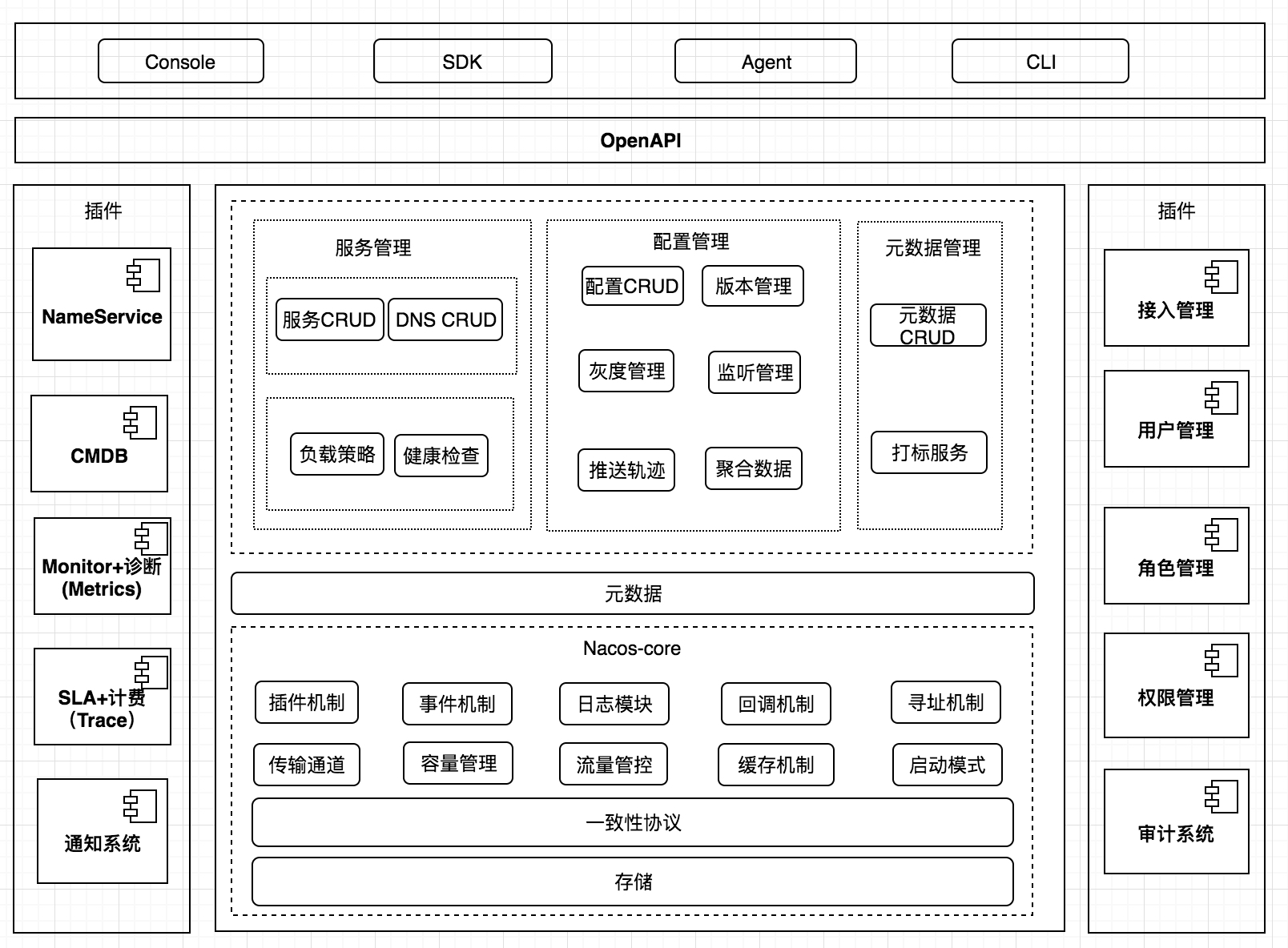 ## Nacos集群成员节点寻址模式
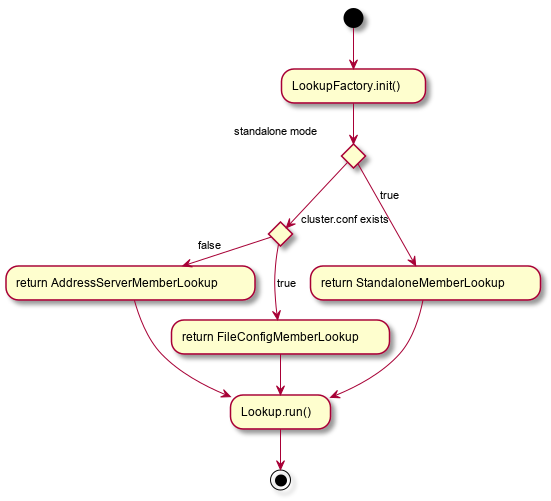
在1.3.0-BETA之前,nacos的naming模块以及config模块存在各自的集群成员节点列表管理任务。为了统一nacos集群下成员列表的寻址模式,将集群节点管理的实现从naming模块以及config模块剥离出来,统一下沉到了core模块的寻址模,同时新增命令行参数-Dnacos.member.list进行设置nacos集群节点列表,该参数可以看作是cluster.conf文件的一个替代。目前nacos的寻址模式类别如下
- 单机模式下:StandaloneMemberLookup
- 集群模式
- cluster.conf文件存在:FileConfigMemberLookup
- cluster.conf文件不存在或者 -Dnacos.member.list没有设置:AddressServerMemberLookup
逻辑图如下
寻址模式详细
接下来介绍除了单机模式下的寻址模式的其他两种寻址模式
FileConfigMemberLookup
该寻址模式是基于cluster.conf文件进行管理的,每个节点会读取各自{nacos.home}/conf下的cluster.conf文件后,会自动向操作系统的_inotify_机制注册一个目录监听器,监听
{nacos.home}/conf下的cluster.conf的成员节点列表内容。
private FileWatcher watcher = new FileWatcher() {
		@Override
		public void onChange(FileChangeEvent event) {
			readClusterConfFromDisk();
		}

		@Override
		public boolean interest(String context) {
			return StringUtils.contains(context, "cluster.conf");
		}
};

@Override
public void run() throws NacosException {
	readClusterConfFromDisk();

	if (memberManager.getServerList().isEmpty()) {
		throw new NacosException(NacosException.SERVER_ERROR,
					"Failed to initialize the member node, is empty");
	}

	// Use the inotify mechanism to monitor file changes and automatically
	// trigger the reading of cluster.conf
	try {
		WatchFileCenter.registerWatcher(ApplicationUtils.getConfFilePath(), watcher);
	}
	catch (Throwable e) {
		Loggers.CLUSTER.error("An exception occurred in the launch file monitor : {}", e);
	}
}
首次启动时直接读取cluster.conf文件内的节点列表信息,然后向WatchFileCenter注册一个目录监听器,当cluster.conf文件发生变动时自动触发_readClusterConfFromDisk()_重新读取cluster.conf文件
AddressServerMemberLookup
该寻址模式是基于一个额外的web服务器来管理cluster.conf,每个节点定期向该web服务器请求cluster.conf的文件内容,然后实现集群节点间的寻址,以及扩缩容。
当需要进行集群扩缩容时,只需要修改cluster.conf文件即可,然后每个节点向地址服务器请求时会自动的得到最新的cluster.conf文件内容。
public void init(ServerMemberManager memberManager) throws NacosException {
	super.init(memberManager);
	initAddressSys();
	this.maxFailCount = Integer.parseInt(ApplicationUtils.getProperty("maxHealthCheckFailCount", "12"));
}

private void initAddressSys() {
	String envDomainName = System.getenv("address_server_domain");
	if (StringUtils.isBlank(envDomainName)) {
		domainName = System.getProperty("address.server.domain", "jmenv.tbsite.net");
	} else {
		domainName = envDomainName;
	}
	String envAddressPort = System.getenv("address_server_port");
	if (StringUtils.isBlank(envAddressPort)) {
		addressPort = System.getProperty("address.server.port", "8080");
	} else {
		addressPort = envAddressPort;
	}
	addressUrl = System.getProperty("address.server.url", memberManager.getContextPath() + "/" + "serverlist");
	addressServerUrl = "http://" + domainName + ":" + addressPort + addressUrl;
	envIdUrl = "http://" + domainName + ":" + addressPort + "/env";

	Loggers.CORE.info("ServerListService address-server port:" + addressPort);
	Loggers.CORE.info("ADDRESS_SERVER_URL:" + addressServerUrl);
}

@SuppressWarnings("PMD.UndefineMagicConstantRule")
@Override
public void run() throws NacosException {
	// With the address server, you need to perform a synchronous member node pull at startup
	// Repeat three times, successfully jump out
	boolean success = false;
	Throwable ex = null;
    int maxRetry = ApplicationUtils.getProperty("nacos.core.address-server.retry", Integer.class, 5);
	for (int i = 0; i < maxRetry; i ++) {
		try {
			syncFromAddressUrl();
			success = true;
			break;
		} catch (Throwable e) {
			ex = e;
			Loggers.CLUSTER.error("[serverlist] exception, error : {}", ex);
		}
	}
	if (!success) {
		throw new NacosException(NacosException.SERVER_ERROR, ex);;
	}

	task = new AddressServerSyncTask();
	GlobalExecutor.scheduleSyncJob(task, 5_000L);
}
在初始化时,会主动去向地址服务器同步当前的集群成员列表信息,如果失败则进行重试,其最大重试次数可通过设置_nacos.core.address-server.retry_来控制,默认是5次,然后成功之后,将创建定时任务去向地址服务器同步集群成员节点信息
RPC端口协商
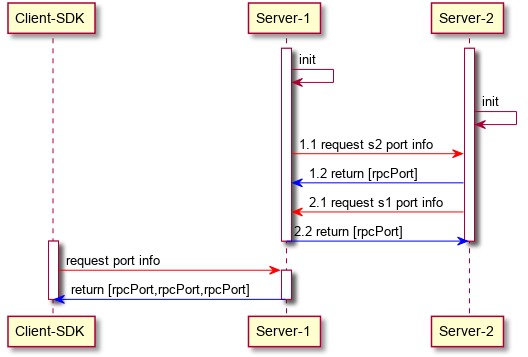
由于将来Nacos会对整体通信通道做升级,采用GRPC优化nacos-server之间,nacos-client与nacos-server之间的通信,同时为了兼容目前已有的HTTP协议接口,那么势必会带来这个问题,本机用于RPC协议的端口如何让其他节点知道?这里有两个解决方案
重新设计cluster.conf
之前的cluster.conf格式
ip[:port]
ip[:port]
ip[:port]
由于nacos默认端口是8848,因此在端口未被修改的情况下,可以直接写IP列表
新的cluster.conf
ip[:port][:RPC_PORT]
ip[:port][:RPC_PORT]
ip[:port][:RPC_PORT]
对于之前的cluster.conf是完全支持的,因为nacos内部可以通过一些计算来约定RPC_PORT的端口值,也可以通过显示的设置来约定。通过计算来约定RPC_PORT的代码如下
// member port
int port = Member.getPort();
// Set the default Raft port information for security
int rpcPort = port - 1000;
但是这样会有一个问题,即如果用户手动设置了RPC_PORT的话,那么对于客户端、服务端来说,感知新的RPC_PORT就要修改对应的配置文件或者初始化参数。因此希望说能够让用户无感知的过渡到RPC_PORT通信通道,即用户需要对RPC协议使用的端口无需自己在进行设置
端口协商
端口协商即利用目前已有的HTTP接口,将RPC协议占用的端口通过HTTP接口进行查询返回,这样无论是客户端还是服务端,都无需修改目前已有的初始化参数或者cluster.conf文件,其大致时序图如下
Nacos一致性协议协议层抽象
从nacos的未来的整体架构图可以看出,一致性协议层将是作为nacos的最为核心的模块,将服务于构建在core模块之上的各个功能模块,或者服务与core模块本身。而一致性协议因为分区容错性的存在,需要在可用性与一致性之间做选择,因此就存在两大类一致性:最终一致性和强一致性。在nacos中,这两类一致性协议都是可能用到的,比如naming模块,对于服务实例的数据管理分别用到了AP以及CP,而对于config模块,将会涉及使用CP。同时还有如下几个功能需求点
- 目前持久化服务使用用了变种版本的raft,并且业务和raft协议耦合,因此需要抽离解耦,同时是选择一个标准的Java版Raft实现
- 对于中小用户,配置基本不超过100个,独立一个mysql,相对重一些,需要一个轻量化的存储方案,并且支持2.0不依赖mysql和3.0依赖mysql可配置能力
- 由于CP或者AP,其存在多种实现,如何对一致性协议层做一次很好的抽象,以便将来可以快速的实现底层一致性协议具体实现的替换,比如Raft协议,目前nacos的选型是JRaft,不排除将来nacos会自己实现一个标准raft协议或者实现Paxos协议
- 由于Nacos存在多个独立工作的功能模块,每个功能模块之间不能出现影响,比如A模块处理请求过慢或者出现异常时,不能影响B模块的正常工作,即每个功能模块在使用一致性协议时,如何将每个模块的数据处理进行隔离?
根据一致协议以及上述功能需求点,本次做了一个抽象的一致协议层以及相关的接口
一致协议接口:ConsistencyProtocol
所谓一致性,即多个副本之间是否能够保持一致性的特性,而副本的本质就是数据,对数据的操作,不是获取就是修改。同时,一致协议其实是针对分布式情况的,而这必然涉及多个节点,因此,需要有相应的接口能够调整一致性协议的协同工作节点。如果我们要观察一致性协议运行的情况,该怎么办?比如Raft协议,我们希望得知当前集群中的Leader是谁,任期的情况,当前集群中的成员节点有谁?因此,还需要提供一个一致性协议元数据获取。
综上所述,ConsistencyProtcol的大致设计可以出来了
/**
 * Has nothing to do with the specific implementation of the consistency protocol
 * Initialization sequence: init(Config)
 *
 * <ul>
 *     <li>{@link Config} : Relevant configuration information required by the consistency protocol,
 *     for example, the Raft protocol needs to set the election timeout time, the location where
 *     the Log is stored, and the snapshot task execution interval</li>
 *     <li>{@link ConsistencyProtocol#protocolMetaData()} : Returns metadata information of the consistency
 *     protocol, such as leader, term, and other metadata information in the Raft protocol</li>
 * </ul>
 *
 * @author <a href="mailto:liaochuntao@live.com">liaochuntao</a>
 */
public interface ConsistencyProtocol<T extends Config> extends CommandOperations {

    /**
     * Consistency protocol initialization: perform initialization operations based on the incoming Config
     * 一致性协议初始化,根据 Config 实现类
     *
     * @param config {@link Config}
     */
    void init(T config);

    /**
     * Copy of metadata information for this consensus protocol
     * 该一致性协议的元数据信息
     *
     * @return metaData {@link ProtocolMetaData}
     */
    ProtocolMetaData protocolMetaData();

    /**
     * Obtain data according to the request
     * 数据获取操作,根据GetRequest中的请求上下文进行查询相应的数据
     *
     * @param request request
     * @return data {@link GetRequest}
     * @throws Exception
     */
    GetResponse getData(GetRequest request) throws Exception;

    /**
     * Data operation, returning submission results synchronously
     * 同步数据提交,在 Datum 中已携带相应的数据操作信息
     *
     * @param data {@link Log}
     * @return submit operation result
     * @throws Exception
     */
    LogFuture submit(Log data) throws Exception;

    /**
     * Data submission operation, returning submission results asynchronously
     * 异步数据提交,在 Datum 中已携带相应的数据操作信息,返回一个Future,自行操作,提交发生的异常会在CompleteFuture中
     *
     * @param data {@link Log}
     * @return {@link CompletableFuture<LogFuture>} submit result
     * @throws Exception when submit throw Exception
     */
    CompletableFuture<LogFuture> submitAsync(Log data);

    /**
     * New member list
     * 新的成员节点列表,一致性协议自行处理相应的成员节点是加入还是离开
     *
     * @param addresses [ip:port, ip:port, ...]
     */
    void memberChange(Set<String> addresses);

    /**
     * Consistency agreement service shut down
     * 一致性协议服务关闭
     */
    void shutdown();

}
而针对CP协议,由于存在Leader的概念,因此需要提供一个方法用于获取CP协议当前的Leader是谁
public interface CPProtocol<C extends Config> extends ConsistencyProtocol<C> {

	/**
	 * Returns whether this node is a leader node
	 *
	 * @param group business module info
	 * @return is leader
	 * @throws Exception
	 */
	boolean isLeader(String group) throws Exception;

}
数据操作请求提交对象:Log、GetRequest
上面说到,一致性协议其实是对于数据操作而言的,数据操作基本分为两大类:数据查询以及数据修改,同时还要满足不同功能模块之间的数据进行隔离。因此这里针对数据修改操作以及数据查询操作分别阐述。
- 数据修改
- 数据修改操作,一定要知道本次请求是属于哪一个功能模块的
- 数据修改操作,首先一定要知道这个数据的修改操作具体是哪一种修改操作,方便功能模块针对真正的数据修改操作进行相应的逻辑操作
- 数据修改操作,一定要知道修改的数据是什么,即请求体,为了使得一致性协议层更为通用,这里对于请求体的数据结构,选择了byte[]数组
- 数据的类型,由于我们将真正的数据序列化为了byte[]数组,为了能够正常序列化,我们可能还需要记录这个数据的类型是什么
- 本次请求的信息摘要或者标识信息
- 本次请求的额外信息,用于将来扩展需要传输的数据
综上,可以得出Log对象的设计如下
message Log {
		// 功能模块分组信息
    string group = 1;
    // 摘要或者标识
    string key = 2;
    // 具体请求数据
    bytes data = 3;
    // 数据类型
    string type = 4;
    // 更为具体的数据操作
    string operation = 5;
    // 额外信息
    map<string, string> extendInfo = 6;
}
- 数据查询
- 数据查询操作,一定要知道本次请求是由哪一个功能模块发起的
- 数据查询的条件是什么,为了兼容各种存储结构的数据查询操作,这里用byte[]进行存储
- 本次请求的额外信息,用于将来扩展需要传输的数据
综上,可以得出GetRequest对象的设计如下
message GetRequest {
	  // 功能模块分组信息
    string group = 1;
    // 具体请求数据
    bytes data = 2;
    // 额外信息
    map<string, string> extendInfo = 3;
}
功能模块使用一致性协议:LogProcessor
当数据操作通过一致性协议进行submit之后,每个节点需要去处理这个Log或者GetRequest对象,因此,我们需要抽象出一个Log、GetRequest对象的Processor,不同的功能模块通过实现该处理器,ConsistencyProtocol内部会根据Log、GetRequest的group属性,将Log、GetRequest对象路由到具体的Processor,当然,Processor也需要表明自己是属于哪一个功能模块的。
public abstract class LogProcessor {

    /**
     * get data by key
     *
     * @param request request {@link GetRequest}
     * @return target type data
     */
    public abstract GetResponse getData(GetRequest request);

    /**
     * Process Submitted Log
     *
     * @param log {@link Log}
     * @return {@link boolean}
     */
    public abstract LogFuture onApply(Log log);

    /**
     * Irremediable errors that need to trigger business price cuts
     *
     * @param error {@link Throwable}
     */
    public void onError(Throwable error) {
    }

    /**
     * In order for the state machine that handles the transaction to be able to route
     * the Log to the correct LogProcessor, the LogProcessor needs to have an identity
     * information
     *
     * @return Business unique identification name
     */
    public abstract String group();

}
针对CP协议,比如Raft协议,存在快照的设计,因此我们需要针对CP协议单独扩展出一个方法
public abstract class LogProcessor4CP extends LogProcessor {

    /**
     * Discovery snapshot handler
     * It is up to LogProcessor to decide which SnapshotOperate should be loaded and saved by itself
     *
     * @return {@link List <SnapshotOperate>}
     */
    public List<SnapshotOperation> loadSnapshotOperate() {
        return Collections.emptyList();
    }

}
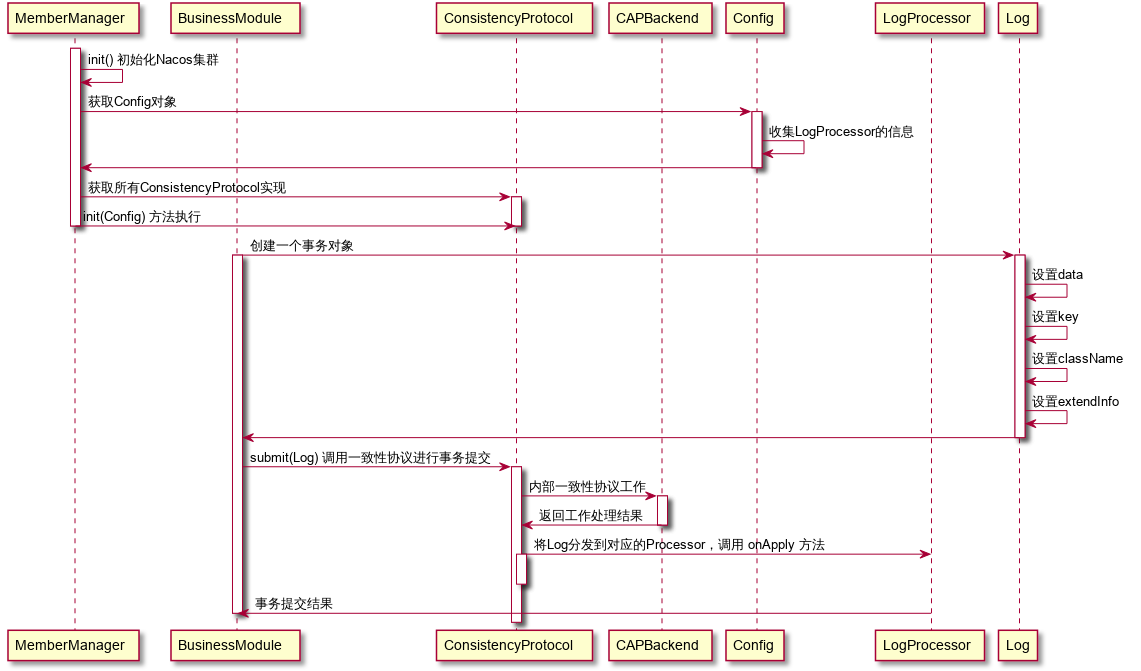
我们可以通过一个时序图看看,一致性协议层的大致工作流程
Nacos一致性协议层之CP协议的实现选择——JRaft
一致性协议层抽象好之后,剩下就是具体一致性协议实现的选择了,这里我们选择了蚂蚁金服开源的JRaft,那么我们如何将JRaft作为CP协议的一个Backend呢?下面的简单流程图描述了当JRaft作为CP协议的一个Backend时的初始化流程
/**
 * A concrete implementation of CP protocol: JRaft
 *
 * <pre>
 *                                           ┌──────────────────────┐
 *                                           │                      │
 *            ┌──────────────────────┐       │                      ▼
 *            │   ProtocolManager    │       │        ┌───────────────────────────┐
 *            └──────────────────────┘       │        │for p in [LogProcessor4CP] │
 *                        │                  │        └───────────────────────────┘
 *                        ▼                  │                      │
 *      ┌──────────────────────────────────┐ │                      ▼
 *      │    discovery LogProcessor4CP     │ │             ┌─────────────────┐
 *      └──────────────────────────────────┘ │             │  get p.group()  │
 *                        │                  │             └─────────────────┘
 *                        ▼                  │                      │
 *                 ┌─────────────┐           │                      │
 *                 │ RaftConfig  │           │                      ▼
 *                 └─────────────┘           │      ┌──────────────────────────────┐
 *                        │                  │      │  create raft group service   │
 *                        ▼                  │      └──────────────────────────────┘
 *              ┌──────────────────┐         │
 *              │  JRaftProtocol   │         │
 *              └──────────────────┘         │
 *                        │                  │
 *                     init()                │
 *                        │                  │
 *                        ▼                  │
 *               ┌─────────────────┐         │
 *               │   JRaftServer   │         │
 *               └─────────────────┘         │
 *                        │                  │
 *                        │                  │
 *                        ▼                  │
 *             ┌────────────────────┐        │
 *             │JRaftServer.start() │        │
 *             └────────────────────┘        │
 *                        │                  │
 *                        └──────────────────┘
 * </pre>
 *
 * @author <a href="mailto:liaochuntao@live.com">liaochuntao</a>
 */
JRaftProtocol是当JRaft作为CP协议的Backend时的一个ConsistencyProtocol的具体实现,其内部有一个JRaftServer成员属性,JRaftServer分装了JRaft的各种API操作,比如数据操作的提交,数据的查询,成员节点的变更,Leader节点的查询等等。
注意事项:JRaft运行期间产生的数据在${nacos.home}/data/protocol/raft文件目录下。不同的业务模块有不同的文件分组,如果当节点出现crash或者异常关闭时,清空该目录下的文件,重启节点即可
由于JRaft实现了raft group的概念,因此,完全可以利用raft group的设计,为每个功能模块单独创建一个raft group。这里给出部分代码,该代码体现了如何将LogProcessor嵌入到状态机中并为每个LogPrcessor创建一个Raft Group
synchronized void createMultiRaftGroup(Collection<LogProcessor4CP> processors) {
	// There is no reason why the LogProcessor cannot be processed because of the synchronization
	if (!this.isStarted) {
		this.processors.addAll(processors);
		return;
	}

	final String parentPath = Paths.get(ApplicationUtils.getNacosHome(), "protocol/raft").toString();

	for (LogProcessor4CP processor : processors) {
		final String groupName = processor.group();
		if (alreadyRegisterBiz.contains(groupName)) {
			throw new DuplicateRaftGroupException(groupName);
		}
		alreadyRegisterBiz.add(groupName);
		final String logUri = Paths.get(parentPath, groupName, "log").toString();
		final String snapshotUri = Paths.get(parentPath, groupName, "snapshot")
					.toString();
		final String metaDataUri = Paths.get(parentPath, groupName, "meta-data")
					.toString();

		// Initialize the raft file storage path for different services
		try {
			DiskUtils.forceMkdir(new File(logUri));
			DiskUtils.forceMkdir(new File(snapshotUri));
			DiskUtils.forceMkdir(new File(metaDataUri));
		}
		catch (Exception e) {
			Loggers.RAFT.error("Init Raft-File dir have some error : {}", e);
			throw new RuntimeException(e);
		}

		// Ensure that each Raft Group has its own configuration and NodeOptions
		Configuration configuration = conf.copy();
		NodeOptions copy = nodeOptions.copy();
		// Here, the LogProcessor is passed into StateMachine, and when the StateMachine
		// triggers onApply, the onApply of the LogProcessor is actually called
		NacosStateMachine machine = new NacosStateMachine(this, processor);

		copy.setLogUri(logUri);
		copy.setRaftMetaUri(metaDataUri);
		copy.setSnapshotUri(snapshotUri);
		copy.setFsm(machine);
		copy.setInitialConf(configuration);

		// Set snapshot interval, default 1800 seconds
		int doSnapshotInterval = ConvertUtils.toInt(raftConfig.getVal(RaftSysConstants.RAFT_SNAPSHOT_INTERVAL_SECS),
					RaftSysConstants.DEFAULT_RAFT_SNAPSHOT_INTERVAL_SECS);

		// If the business module does not implement a snapshot processor, cancel the snapshot
		doSnapshotInterval = CollectionUtils.isEmpty(processor.loadSnapshotOperate()) ? 0 : doSnapshotInterval;

		copy.setSnapshotIntervalSecs(doSnapshotInterval);
		Loggers.RAFT.info("create raft group : {}", groupName);
		RaftGroupService raftGroupService = new RaftGroupService(groupName, localPeerId, copy, rpcServer, true);

		// Because RpcServer has been started before, it is not allowed to start again here
		Node node = raftGroupService.start(false);
		machine.setNode(node);
		RouteTable.getInstance().updateConfiguration(groupName, configuration);

		// Turn on the leader auto refresh for this group
		Random random = new Random();
		long period = nodeOptions.getElectionTimeoutMs() + random.nextInt(5 * 1000);
		RaftExecutor.scheduleRaftMemberRefreshJob(() -> refreshRouteTable(groupName), period, period, TimeUnit.MILLISECONDS);
		// Save the node instance corresponding to the current group
		multiRaftGroup.put(groupName, new RaftGroupTuple(node, processor, raftGroupService));
	}
}
或许有的人会有疑问,为什么要创建多个raft group,既然之前已经设计出了LogProcessor,完全可以利用一个Raft Group,在状态机appl时,根据Log的group属性进行路由到不同的LogProcessor即可,每个功能模块就创建一个raft group,不是会消耗大量的资源吗?
正如之前所说,我们希望独立工作的模块之间相互不存在影响,比如A模块处理Log因为存在Block操作可能使得apply的速度缓慢,亦或者可能中途发生异常,对于Raft协议来说,当日志apply失败时,状态机将不能够继续向前推进,因为如果继续向前推进的话,由于上一步的apply失败,后面的所有apply都可能失败,将会导致这个节点的数据与其他节点的数据永远不一致。如果说我们将所有独立工作的模块,对于数据操作的请求处理放在同一个raft group,即一个状态机中,就不可避免的会出现上述所说的问题,某个模块在apply日志发生不可控的因素时,会影响其他模块的正常工作。
JRaft运维操作
为了使用者能够对JRaft进行相关简单的运维,比如Leader的切换,重置当前Raft集群成员,触发某个节点进行Snapshot操作等等,提供了一个简单的HTTP接口进行操作,并且该接口有一定的限制,即每次只会执行一条运维指令
- 切换某一个Raft Group的Leader节点
POST /nacos/v1/core/ops/raft
{
	"groupId": "xxx",
    "transferLeader": "ip:{raft_port}"
}
- 重置某一个Raft Group的集群成员
POST /nacos/v1/core/ops/raft
{
	"groupId": "xxx",
    "resetRaftCluster": "ip:{raft_port},ip:{raft_port},ip:{raft_port},ip:{raft_port}"
}
- 触发某一个Raft Group执行快照操作
POST /nacos/v1/core/ops/raft
{
	"groupId": "xxx",
    "doSnapshot": "ip:{raft_port}"
}
JRaft协议相关配置参数
### Sets the Raft cluster election timeout, default value is 5 second
nacos.core.protocol.raft.data.election_timeout_ms=5000
### Sets the amount of time the Raft snapshot will execute periodically, default is 30 minute
nacos.core.protocol.raft.data.snapshot_interval_secs=30
### Requested retries, default value is 1
nacos.core.protocol.raft.data.request_failoverRetries=1
### raft internal worker threads
nacos.core.protocol.raft.data.core_thread_num=8
### Number of threads required for raft business request processing
nacos.core.protocol.raft.data.cli_service_thread_num=4
### raft linear read strategy, defaults to index
nacos.core.protocol.raft.data.read_index_type=ReadOnlySafe
### rpc request timeout, default 5 seconds
nacos.core.protocol.raft.data.rpc_request_timeout_ms=5000
### Maximum size of each file RPC (snapshot copy) request between members, default is 128 K
nacos.core.protocol.raft.data.max_byte_count_per_rpc=131072
### Maximum number of logs sent from leader to follower, default is 1024
nacos.core.protocol.raft.data.max_entries_size=1024
### Maximum body size for sending logs from leader to follower, default is 512K
nacos.core.protocol.raft.data.max_body_size=524288
### Maximum log storage buffer size, default 256K
nacos.core.protocol.raft.data.max_append_buffer_size=262144
### Election timer interval will be a random maximum outside the specified time, default is 1 second
nacos.core.protocol.raft.data.max_election_delay_ms=1000
### Specify the ratio between election timeout and heartbeat interval. Heartbeat interval is equal to
### electionTimeoutMs/electionHeartbeatFactor,One tenth by default.
nacos.core.protocol.raft.data.election_heartbeat_factor=10
### The tasks submitted to the leader accumulate the maximum batch size of a batch flush log storage. The default is 32 tasks.
nacos.core.protocol.raft.data.apply_batch=32
### Call fsync when necessary when writing logs and meta information, usually should be true
nacos.core.protocol.raft.data.sync=true
### Whether to write snapshot / raft meta-information to call fsync. The default is false. When sync is true, it is preferred to respect sync.
nacos.core.protocol.raft.data.sync_meta=false
### Internal disruptor buffer size. For applications with high write throughput, you need to increase this value. The default value is 16384.
nacos.core.protocol.raft.data.disruptor_buffer_size=16384
### Whether to enable replication of pipeline request optimization, which is enabled by default
nacos.core.protocol.raft.data.replicator_pipeline=true
### Maximum number of in-flight requests with pipeline requests enabled, default is 256
nacos.core.protocol.raft.data.max_replicator_inflight_msgs=256
### Whether to enable LogEntry checksum
nacos.core.protocol.raft.data.enable_log_entry_checksum=false
Nacos内嵌分布式ID
nacos内嵌的分布式ID为Snakeflower,dataCenterId默认为1,workerId的值计算方式如下
InetAddress address;
try {
	address = InetAddress.getLocalHost();
} catch (final UnknownHostException e) {
	throw new IllegalStateException(
						"Cannot get LocalHost InetAddress, please check your network!");
}
byte[] ipAddressByteArray = address.getAddress();
workerId = (((ipAddressByteArray[ipAddressByteArray.length - 2] & 0B11)
					<< Byte.SIZE) + (ipAddressByteArray[ipAddressByteArray.length - 1]
					& 0xFF));
如果需要手动指定dataCenterId以及workerId,则在application.properties或者启动时添加命令行参数
### set the dataCenterID manually
# nacos.core.snowflake.data-center=
### set the WorkerID manually
# nacos.core.snowflake.worker-id=
Nacos内嵌的轻量的基于Derby的分布式关系型存储
背景
- 如果配置文件数量较少,在集群模式下需要高可用数据库集群作为支撑的成本太大,期望有一个轻量的分布式关系型存储来解决
- nacos内部一些元数据信息存储,比如用户信息,命名空间信息
- 思路来源:github.com/rqlite/rqli…
设计思路
总体
将一次请求操作涉及的SQL上下文按顺序保存起来。然后通过一致协议层将本次请求涉及的SQL上下文进行同步,然后每个节点将其解析并重新按顺序在一次数据库会话中执行。
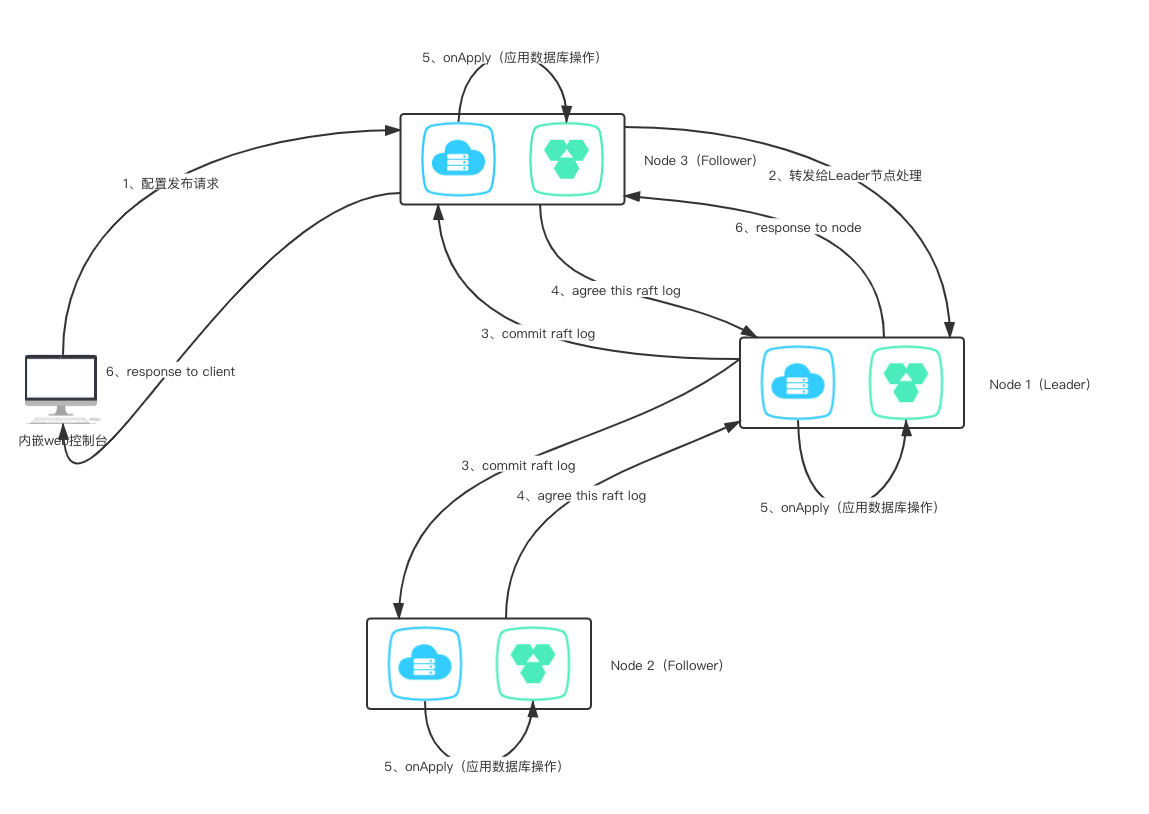
谁可以处理请求
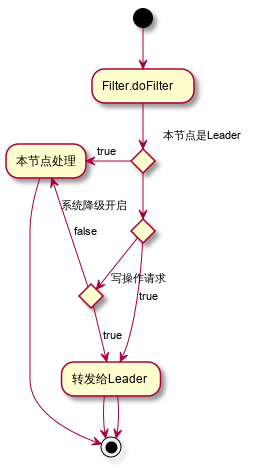
当使用者开启1.3.0-BETA的新特性——内嵌分布式关系型数据存储时,所有的写操作请求都将路由到Leader节点进行处理;但是,由于Raft状态机的特性,当某一个节点在apply数据库操作请求时发生非SQL逻辑错误引发的异常时,将导致状态机无法继续正常进行工作,此时将会触发配置管理模块的降级操作
private void registerSubscribe() {
	NotifyCenter.registerSubscribe(new SmartSubscribe() {

		@Override
		public void onEvent(Event event) {
			if (event instanceof RaftDBErrorRecoverEvent) {
				downgrading = false;
				return;
			}
			if (event instanceof RaftDBErrorEvent) {
				downgrading = true;
			}
		}

		@Override
		public boolean canNotify(Event event) {
			return (event instanceof RaftDBErrorEvent) || (event instanceof RaftDBErrorRecoverEvent);
		}
	});
}
因此,综上所述,可以通过活动图来理解下,什么情况下需要将请求进行转发
相关数据承载对象
数据库的DML语句是select、insert、update、delete,根据SQL语句对于数据操作的性质,可以分为两大类:query以及update,select语句对应的是数据查询,insert、update、delete语句对应的是数据修改。同时在进行数据库操作时,为了避免SQL注入,使用的是PreparedStatement,因此需要SQL语句+参数,因此可以得到两个关于数据库操作的Request对象
- SelectRequest
public class SelectRequest implements Serializable {

    private static final long serialVersionUID = 2212052574976898602L;
    // 查询类别,因为目前使用的是JdbcTemplate,查询单个、查询多个,是否使用RowMapper转为对象
    private byte queryType;
    // sql语句
    // select * from config_info where
    private String sql;
    private Object[] args;
    private String className;
}
- ModifyRequest
public class ModifyRequest implements Serializable {

    private static final long serialVersionUID = 4548851816596520564L;

    private int executeNo;
    private String sql;
    private Object[] args;
}
配置发布
配置发布操作涉及三个事务:
- config_info保存配置信息
- config_tags_relation保存配置与标签的关联关系
- his_config_info保存一条配置操作历史记录
这三个事务都在配置发布这个大事务下,如果说我们对每个事务操作进行一个Raft协议提交,假设1、2两个事务通过Raft提交后都成功Apply了,第三个事务在进行Raft提交后apply失败,那么对于这个配置发布的大事务来说,是需要整体回滚的,否则就会违反原子性,那么可能需要说将事务回滚操作又进行一次Raft提交,那么整体的复杂程度上升,并且直接引入了分布式事务的管理,因此为了避免这个问题,我们将这三个事务涉及的SQL上下文进行整合成一个大的SQL上下文,对这大的SQL上下文进行Raft协议提交。保证了三个子事务在同一次数据库会话当中,成功解决原子性的问题,同时由于Raft协议对于事务日志的处理是串行执行的,因此相当于将数据库的事务隔离级别调整为串行化。
public void addConfigInfo(final String srcIp, final String srcUser,
			final ConfigInfo configInfo, final Timestamp time,
			final Map<String, Object> configAdvanceInfo, final boolean notify) {

	try {
        // 同过雪花ID获取一个ID值
		long configId = idGeneratorManager.nextId(configInfoId);
		long configHistoryId = idGeneratorManager.nextId(this.configHistoryId);

        // 配置插入
		addConfigInfoAtomic(configId, srcIp, srcUser, configInfo, time, configAdvanceInfo);
		String configTags = configAdvanceInfo == null ? null : (String) configAdvanceInfo.get("config_tags");

        // 配置与标签信息关联操作
		addConfigTagsRelation(configId, configTags, configInfo.getDataId(), configInfo.getGroup(), configInfo.getTenant());
		// 配置历史插入
        insertConfigHistoryAtomic(configHistoryId, configInfo, srcIp, srcUser, time, "I");

		boolean result = databaseOperate.smartUpdate();
		if (!result) {
			throw new NacosConfigException("Config add failed");
		}

		if (notify) {
			EventDispatcher.fireEvent(
						new ConfigDataChangeEvent(false, configInfo.getDataId(),
								configInfo.getGroup(), configInfo.getTenant(),
								time.getTime()));
		}
	}
	finally {
		SqlContextUtils.cleanCurrentSqlContext();
	}
}

public long addConfigInfoAtomic(final long id, final String srcIp,
			final String srcUser, final ConfigInfo configInfo, final Timestamp time,
			Map<String, Object> configAdvanceInfo) {
	...
    // 参数处理
    ...
	final String sql =
				"INSERT INTO config_info(id, data_id, group_id, tenant_id, app_name, content, md5, src_ip, src_user, gmt_create,"
						+ "gmt_modified, c_desc, c_use, effect, type, c_schema) VALUES(?,?,?,?,?,?,?,?,?,?,?,?,?,?,?,?)";
	final Object[] args = new Object[] { id, configInfo.getDataId(),
				configInfo.getGroup(), tenantTmp, appNameTmp, configInfo.getContent(),
				md5Tmp, srcIp, srcUser, time, time, desc, use, effect, type, schema, };
	SqlContextUtils.addSqlContext(sql, args);
	return id;
}

public void addConfigTagRelationAtomic(long configId, String tagName, String dataId,
			String group, String tenant) {
	final String sql =
				"INSERT INTO config_tags_relation(id,tag_name,tag_type,data_id,group_id,tenant_id) "
						+ "VALUES(?,?,?,?,?,?)";
	final Object[] args = new Object[] { configId, tagName, null, dataId, group,
				tenant };
	SqlContextUtils.addSqlContext(sql, args);
}

public void insertConfigHistoryAtomic(long configHistoryId, ConfigInfo configInfo,
			String srcIp, String srcUser, final Timestamp time, String ops) {
	...
    // 参数处理
    ...
	final String sql =
				"INSERT INTO his_config_info (id,data_id,group_id,tenant_id,app_name,content,md5,"
						+ "src_ip,src_user,gmt_modified,op_type) VALUES(?,?,?,?,?,?,?,?,?,?,?)";
	final Object[] args = new Object[] { configHistoryId, configInfo.getDataId(),
				configInfo.getGroup(), tenantTmp, appNameTmp, configInfo.getContent(),
				md5Tmp, srcIp, srcUser, time, ops };

	SqlContextUtils.addSqlContext(sql, args);
}

/**
 * Temporarily saves all insert, update, and delete statements under
 * a transaction in the order in which they occur
 *
 * @author <a href="mailto:liaochuntao@live.com">liaochuntao</a>
 */
public class SqlContextUtils {

    private static final ThreadLocal<ArrayList<ModifyRequest>> SQL_CONTEXT =
            ThreadLocal.withInitial(ArrayList::new);

    public static void addSqlContext(String sql, Object... args) {
        ArrayList<ModifyRequest> requests = SQL_CONTEXT.get();
        ModifyRequest context = new ModifyRequest();
        context.setExecuteNo(requests.size());
        context.setSql(sql);
        context.setArgs(args);
        requests.add(context);
        SQL_CONTEXT.set(requests);
    }

    public static List<ModifyRequest> getCurrentSqlContext() {
        return SQL_CONTEXT.get();
    }

    public static void cleanCurrentSqlContext() {
        SQL_CONTEXT.remove();
    }

}
通过一个时序图来更加直观的理解

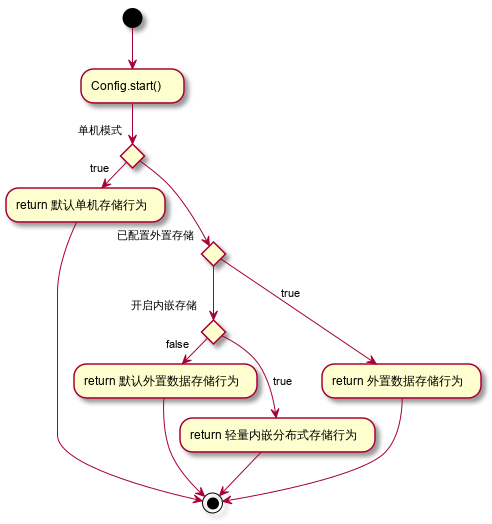
如何使用新特性
#*************** Embed Storage Related Configurations ***************#
### This value is true in stand-alone mode and false in cluster mode
### If this value is set to true in cluster mode, nacos's distributed storage engine is turned on
embeddedStorage=true
是否启用内嵌的分布式关系型存储的活动图
新特性的相关运维操作
直接查询每个节点的derby存储的数据
GET /nacos/v1/cs/ops/derby?sql=select * from config_info

return List<Map<String, Object>>
不足
- 在数据库上层构建一层分布式数据操作同步层,对数据库的操作存在了限制,比如第一步insert操作,然后select操作,最后在update操作,这种在数据修改语句中穿插着查询语句的操作顺序是不支持的
- 限制了数据库的性能,由于间接的将数据库事务隔离级别调整为了串行化,人为的将并发能力降低了
未来演进
将于Apache Derby官方一起尝试基于Raft实现BingLog的同步复制操作,从底层实现数据库同步能力